
Ever wondered about the magic behind those slick, responsive interfaces you interact with every day on your computer? Whether you’re clicking buttons, navigating menus, or just marveling at the visual splendor of your favorite applications, there’s a good chance a powerful, unsung hero is working tirelessly in the background. We’re talking about GTK – formerly known as GIMP ToolKit, and then GTK+ – a free and open-source widget toolkit that’s been shaping the graphical user interfaces (GUIs) of countless applications for decades.
GTK isn’t just another piece of software; it’s a fundamental building block for a vast ecosystem of applications, especially within the Linux world and specifically for the GNOME desktop environment. But don’t let its origins fool you! This versatile toolkit isn’t confined to Linux; it flexes its muscles across various operating systems, bringing intuitive and beautiful user experiences to Windows, macOS, and even web browsers.
So, buckle up, because we’re about to take a super deep dive into the fascinating world of GTK. We’ll peel back the layers to understand what makes it tick, how it evolved, and why it’s such a crucial player in the realm of software development. Get ready to have your mind blown by the sheer ingenuity behind this cross-platform powerhouse, covering everything from its core mission to how it handles different platforms and empowers developers.

1. What is GTK and Its Core Mission?
At its heart, GTK is a free and open-source cross-platform widget toolkit, designed explicitly for creating graphical user interfaces. Think of it as a vast toolbox filled with all the components (widgets like buttons, menus, text fields) you need to build an application’s visual front end. Its primary target has always been Linux, with a special emphasis on the GNOME desktop environment, but its utility extends far beyond that, making it a truly cross-platform marvel.
What makes GTK even more appealing is its licensing. It operates under the terms of the GNU LGPL (Lesser General Public License). This means that whether you’re building free software or proprietary applications, you’re welcome to use GTK. This inclusive licensing approach has been pivotal in fostering a broad community of developers and ensuring its widespread adoption across different types of projects, from grassroots open-source initiatives to commercial ventures.
Originally conceived as the “GIMP ToolKit” for the GNU Image Manipulation Program (GIMP), GTK’s mission was clear from the start: to provide robust and flexible tools for building desktop applications. It’s written primarily in C, which provides a solid, high-performance foundation, but don’t worry, its design is incredibly object-oriented, leveraging the GLib object system known as GObject to make development efficient and structured. This combination of power and flexibility is a core reason why GTK remains so relevant today.

2. The Evolution of GTK’s Name and Identity
The story of GTK’s name is a fun little journey through its history, reflecting its growth and increasing independence. It all began as the “GIMP ToolKit” because it was originally designed and used within the GNU Image Manipulation Program. This initial purpose was a practical one: to replace the Motif toolkit, which Peter Mattis, one of GIMP’s original authors, found himself disenchanted with.
After successfully replacing Motif by GIMP’s 0.60 release, the toolkit proved its worth beyond its initial scope. It was then re-written to be more object-oriented and, in a significant step, renamed “GTK+”. This plus sign signified its enhanced capabilities and its readiness to be a general-purpose toolkit for a wider array of applications, first being utilized in GIMP’s 0.99 release. The addition of the plus truly marked its transition from a GIMP-specific tool to a broader, more ambitious project.
However, the journey didn’t stop there! In February 2019, during a Hackathon and subsequently announced on February 6, 2019, it was declared that GTK 4 would drop the “+” from the project’s name, returning to simply “GTK.” This seemingly small change symbolized a modern evolution and simplification, aligning with the project’s contemporary identity as a mature, standalone, and powerful toolkit. So, while you might still hear “GTK+” floating around, the official, streamlined name is just “GTK.”

3. Key Architectural Pillars: GDK, GSK, and GObject
To truly understand GTK, we need to peek under the hood at some of its fundamental architectural components. These aren’t just technical terms; they are the bedrock upon which all GTK applications are built, ensuring everything from basic drawing to complex interactions works seamlessly. Let’s start with GDK, the GTK Drawing Kit.
GDK acts as a crucial abstraction layer, wrapping around the low-level functions provided by the underlying windowing and graphics systems. Whether your application is running on X11, Wayland, macOS’s Quartz, or Windows’ GDI, GDK provides a unified interface for GTK to interact with. It also relies heavily on Cairo for rendering, ensuring high-quality vector graphics. In essence, GDK is the unsung hero that allows GTK to be truly cross-platform, handling the nitty-gritty details of talking to different operating system display servers.
Then there’s GSK, the GTK Scene Graph Kit, which is all about rendering and managing the visual elements of your application. GSK is the rendering and scene graph API for GTK, sitting between your graphical control elements (widgets) and the actual display. It was merged into GTK version 3.90 in March 2017, streamlining the rendering pipeline. In GTK 4, GSK has taken on an even more prominent role, de-emphasizing Cairo in favor of more modern renderers like Vulkan or GL for drawing most graphical elements, pushing the boundaries of performance and visual fidelity.
Finally, we have GObject, which isn’t just a part of GTK, but the very foundation of its object-oriented nature. While GTK is written in C, it leverages GObject (which is part of the GLib object system) to provide robust object orientation. This allows GTK to manage its many graphical control elements (widgets) in a structured, extensible way. GObject enables polymorphism, inheritance, and signal/slot mechanisms, making GTK’s API consistent and powerful for developers building complex applications. It’s what gives GTK its modern, flexible programming model despite being written in C.
4. Designing Without Code: The Magic of GtkBuilder
Wouldn’t it be great if you could design your application’s user interface visually, without having to write a single line of code? Well, with GTK, you absolutely can, thanks to the wonderful tool known as GtkBuilder. This fantastic feature allows developers to separate the UI design from the application logic, making development faster and more collaborative.
GtkBuilder works by describing the user interface in an Extensible Markup Language (XML) file. You can either write this XML file by hand if you’re a purist, or, more commonly, generate it using a GUI designer. Once you have your `.ui` file, it’s loaded at runtime, and GTK automatically creates the objects and lays out the interface exactly as described. This approach is incredibly powerful because it decouples the visual design from the programming language you’re using, offering immense flexibility.
The beauty of GtkBuilder lies in its independence. Whether you’re writing your application in C, Python, Vala, or any other language with GTK bindings, the XML description of your UI remains consistent. This not only speeds up development by allowing designers to work independently of coders but also makes it easier to modify and maintain interfaces. It’s a testament to GTK’s commitment to making GUI development as accessible and efficient as possible.
5. Multilingual Magic: GTK’s Extensive Language Bindings
One of the most impressive aspects of GTK is its incredible versatility, not just in terms of platform support, but also in the wide array of programming languages it embraces. While GTK itself is primarily written in C, it doesn’t trap developers into using only C for their applications. This inclusivity is achieved through what are known as “language bindings,” which essentially act as translators, allowing GTK to be used from many other languages.
Imagine wanting to build a robust GUI application but preferring Python’s elegant syntax or C++’s object-oriented power. With GTK, you can! Language bindings are readily available for a diverse range of programming languages. This includes popular choices like C++, Genie, JavaScript, Perl, Python, and Vala, among many others. This extensive support means developers aren’t forced into a specific language, greatly expanding GTK’s reach and utility across the programming community.
These bindings aren’t just superficial wrappers; they integrate deeply with GTK’s C core, allowing developers to leverage the full power of the toolkit while writing in their preferred language. This significantly lowers the barrier to entry for many programmers and encourages a broader adoption of GTK for various projects. It’s a true testament to GTK’s open-source philosophy, ensuring that its powerful capabilities are accessible to as many developers as possible, regardless of their language of choice.

6. Behind the Scenes: How GTK Handles Different Platforms with Backends
Ever wondered how a single toolkit can make your application look and feel native on radically different operating systems like Linux, Windows, and macOS? The secret lies in GTK’s clever use of “backends.” These specialized components are what allow GTK applications to display correctly and interact seamlessly with the underlying system’s graphical environment.
GTK supports various backends, each tailored to a specific display server or operating system API. For instance, on Linux systems, you’ll find the Wayland backend for modern display servers (a replacement for X11) and the X11 backend for the traditional X.Org display server. If you’re running a GTK application on Windows, it utilizes the Win32 backend, interfacing directly with the Windows API. For macOS users, the Quartz backend ensures proper integration with the Apple ecosystem.
But wait, there’s more! There’s even a fascinating Broadway backend that allows GTK applications to run directly in web browsers, leveraging HTML5 and WebSockets. While historically innovative, some changes are on the horizon. The X11 and Broadway backends have been marked as deprecated in 2025, signaling an intent to remove them in GTK version 5. This move towards modern display technologies like Wayland and native OS integration demonstrates GTK’s continuous evolution to stay at the cutting edge of GUI development across all platforms. It’s truly a testament to its forward-thinking approach to cross-platform compatibility.
Alright, so we’ve journeyed through the origins and core architecture of GTK, getting a glimpse of its foundational power. But hold on, because there’s so much more to uncover about this incredible toolkit! Now, we’re diving deeper into the advanced features and real-world impact that make GTK a true powerhouse in the world of graphical user interfaces. From how it paints pixels on your screen to the vibrant ecosystems it powers, and even a peek behind the curtain at its debugging superpowers, get ready for some seriously cool insights into what makes GTK tick.
7. The Visual Journey: GTK’s Rendering Evolution
You know how your apps just *look* good? That’s thanks to GTK constantly evolving its rendering capabilities. Back in 2005, with version 2.8, GTK began a significant transition to using Cairo to render most of its graphical control elements. This move was all about bringing high-quality vector graphics to the forefront, making interfaces sharper and more scalable. Fast forward to GTK 3.0, and Cairo was doing all the heavy lifting, ensuring a consistent and beautiful visual experience across the board.
But the tech world never sleeps, and neither does GTK development! In its latest iteration, GTK 4, there’s been a clear de-emphasis on Cairo for drawing the majority of graphical elements. Instead, GTK 4 is pushing the boundaries of performance and visual fidelity by adopting more modern renderers like Vulkan or GL. This shift is a huge deal, promising even smoother animations and more efficient use of your system’s graphics hardware.
This continuous evolution in rendering isn’t just about making things look pretty; it’s about staying at the cutting edge of display technology. Developers and users alike benefit from these advancements, getting applications that are not only visually stunning but also incredibly responsive. It’s a testament to GTK’s commitment to delivering top-tier user experiences, always adapting to the latest in graphics capabilities.
8. A Toolkit of Treasures: Exploring GTK’s Widgets
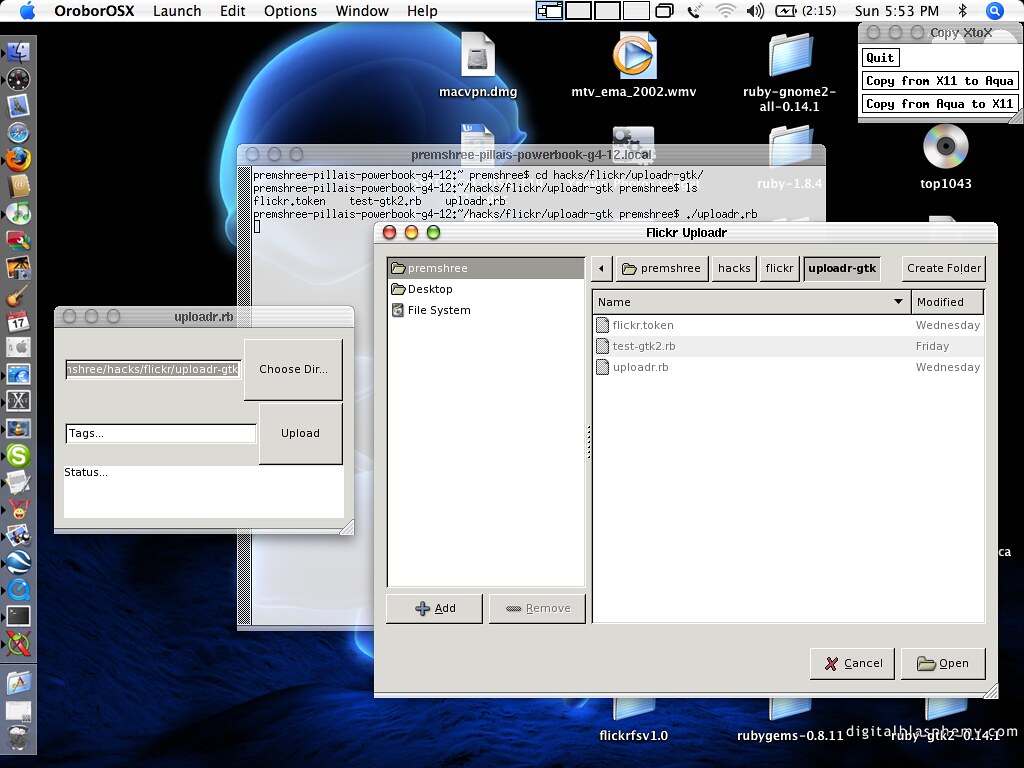
Imagine building a house without bricks, windows, or doors – impossible, right? Widgets are the fundamental building blocks of any GUI, and GTK offers an extensive collection, a real treasure trove for developers. These graphical control elements are what you interact with every day, from the simplest button to the most complex menu.
GTK version 3.22.16, for instance, boasted a whopping 186 active widgets, alongside 36 deprecated ones, showing a constantly refined and expanding library. This huge selection allows developers to craft highly functional and aesthetically pleasing interfaces for a wide array of applications. Whether it’s a text input field, a complex tree view, or a progress bar, GTK has a widget ready to be deployed.
Throughout its history, GTK has consistently introduced new and exciting widgets to meet the demands of modern applications. From the GtkFontSelector in version 1.2 to the GtkFileChooser and GtkComboBox in 2.4, and more recently, GtkHeaderBar and GtkListBox in 3.10, the toolkit grows with the needs of its users. GTK 4 even brings us GtkVideo, GtkMediaFile, and GtkMediaStream for rich media display, proving that the innovation never stops!

9. Decoding the UI: The Indispensable GTK Inspector
Ever wished you had X-ray vision for your application’s interface? Well, GTK gives you just that with its super cool, built-in interactive debugging tool: the GTK Inspector. Introduced with GTK version 3.14, this tool is an absolute lifesaver for developers, letting them peek under the hood of their UIs in real time.
With the GTK Inspector, you can effortlessly inspect and modify UI elements, test out CSS changes on the fly, and deeply analyze the widget structure of your application. It’s like having a live editor for your GUI, allowing for quick tweaks and troubleshooting without constantly recompiling your code. You can enable it with a simple `Control + Shift + I` or `Control + Shift + D` shortcut, or by setting the `GTK_DEBUG=interactive` environment variable.
The features are impressive: real-time CSS testing, widget magnification for detailed inspection, analysis of UI structure, and examination of object properties like type, state, and actions. It even offers global application information and the ability to record and inspect the rendering pipeline. This tool is a prime example of GTK’s commitment to empowering developers, making the debugging process smoother and significantly more efficient.
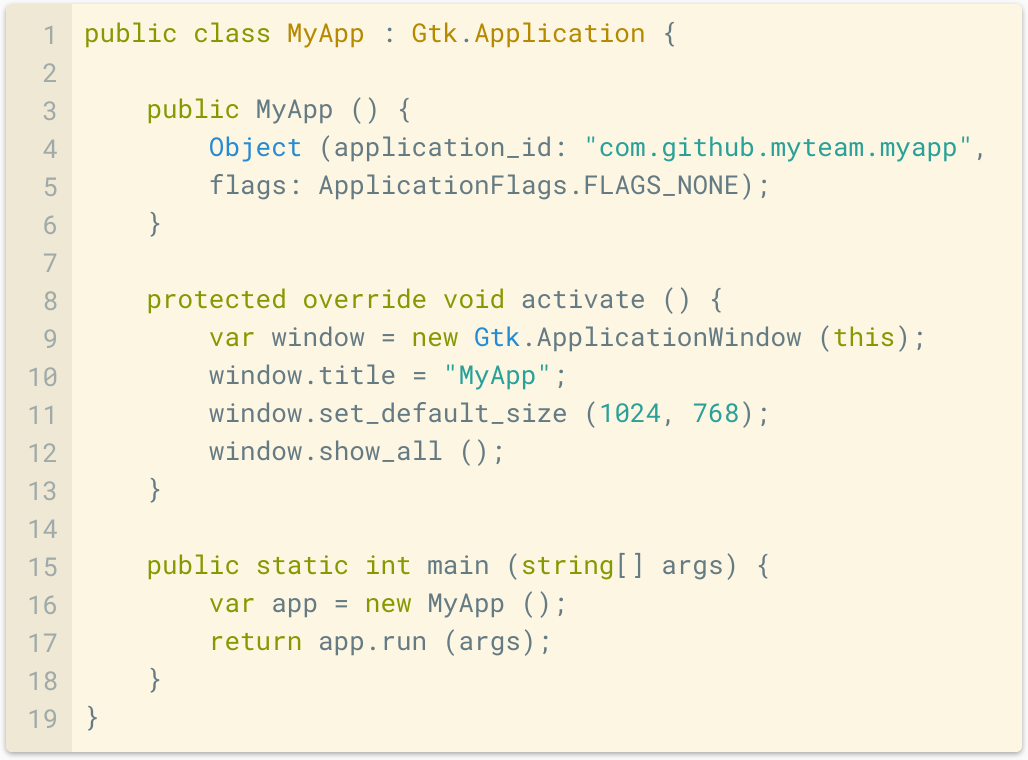
10. Shaping Desktops: GTK’s Influence on Environments and Apps
GTK isn’t just a toolkit; it’s a cornerstone of entire digital worlds. Its influence is profoundly felt across numerous desktop environments, especially within the Linux ecosystem, where it provides the foundational building blocks for diverse user experiences. When we talk about how GTK shapes desktops, we’re talking about a vibrant, interconnected network of software that defines how millions interact with their computers.
Naturally, GNOME, the very project that actively develops GTK, stands as its most prominent user. Programs native to GNOME inherently leverage GTK, creating a cohesive and integrated experience. But GTK’s reach extends far beyond GNOME. Other popular desktop environments like Budgie, Cinnamon (a fork of GNOME 3), MATE (a fork of GNOME 2), Xfce, and Pantheon (developed by elementary OS) all rely on GTK, using various versions of the toolkit to power their interfaces. Even lighter environments like LXDE and specialized ones like Sugar (for primary education) utilize GTK, showcasing its adaptability.
Beyond full desktop environments, countless applications, both famous and specialized, are built with GTK. Think about digital audio workstations like Ardour and REAPER, popular graphics editors like GIMP and Inkscape, and essential office suites such as LibreOffice. Even web browsers like Mozilla Firefox and personal information managers like Mozilla Thunderbird utilize GTK. This expansive list of applications, including BitTorrent clients like Deluge and Transmission, and video tools like HandBrake and Pitivi, underscores GTK’s versatility and robustness across a myriad of use cases, making it a truly pervasive force in software development.

11. The Elephant in the Room: Candid Criticisms of GTK
While GTK is undoubtedly a powerful and widely used toolkit, it hasn’t been without its share of criticisms. Open discussion about these challenges is crucial for growth, and some prominent points have been raised by developers and users over the years. One of the most common critiques revolves around the lack of backward-compatibility, particularly concerning the application programming interface (API) and theming in major updates.
This has meant that application and theme developers often face the task of rewriting portions of their code to ensure compatibility with newer GTK versions. For instance, compatibility breaks occurred during the GTK 3.x development cycle, which Benjamin Otte explained in 2013 were due to intense pressure to innovate, delivering features modern users expect and supporting the evolving Wayland display server protocol. While the intention was to prioritize stability after GTK 4, the official documentation for GTK 5 indicates further API and ABI breaks, similar to past transitions.
Such shifts have led some projects to migrate away from GTK. Aurélien Gâteau, for example, started Gwenview as a GTK application but switched to Qt early on. Dirk Hohndel, a co-developer of Subsurface, criticized GTK developers for being unresponsive to community requests. Hong Jen Yee, the creator of LXDE, moved his project to Qt, renaming it LXQt, due to GTK3’s radical API changes and increased memory usage. Even applications like Audacious, Wireshark, and EasyEffects have made the switch to Qt, citing issues like “GNOME-y and out of place” client-side window decorations or challenges with cross-platform support. These candid discussions highlight areas where GTK aims to improve, even as it continues its developmental journey.
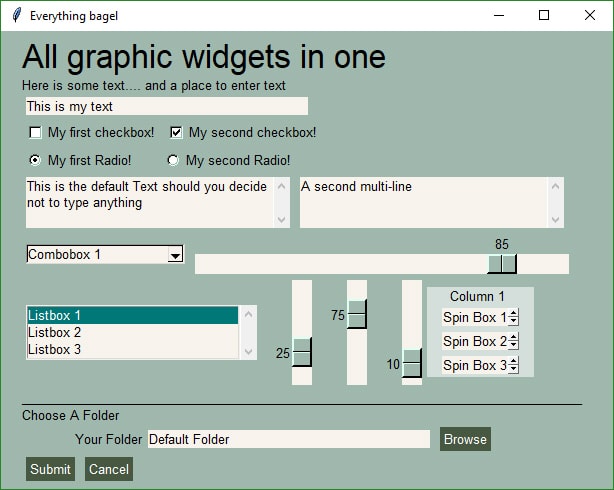
12. Empowering Creators: The Role of GTK GUI Designers
While GtkBuilder allows interfaces to be defined in XML, a visual aid can significantly boost productivity. That’s where GUI designers come into play, serving as powerful tools that empower developers and designers to craft beautiful GTK applications without getting bogged down in manual code writing. These designers transform the abstract XML files into interactive canvases, making UI creation a more intuitive and visually-driven process.
There are several notable GUI designers specifically tailored for GTK. Cambalache, for instance, is a modern successor to Glade and fully supports GTK 4, making it a go-to for contemporary projects. Glade itself, while not actively maintained, has been a long-standing favorite, leveraging the GtkBuilder format that’s built right into GTK. Other options include Gazpacho, a GUI builder for GTK written in Python, and Crow Designer, which uses its own GuiXml format.
These tools are invaluable because they streamline the design workflow, allowing for rapid prototyping and iteration. They bridge the gap between abstract code and tangible user experiences, making GTK development accessible to a wider audience, including those who prefer visual design over raw coding. By supporting such a diverse ecosystem of design tools, GTK reinforces its commitment to empowering creators to bring their application ideas to life with ease and efficiency.
And there you have it, folks! From its powerful rendering capabilities to its vast collection of widgets, its indispensable debugging tools, and its widespread adoption across countless desktop environments and applications, GTK truly is a titan in the world of user interface development. It’s a testament to the power of open-source collaboration, constantly evolving, adapting, and innovating to meet the ever-changing demands of the digital landscape. So, the next time you marvel at a beautifully designed application, take a moment to appreciate the unsung hero, GTK, working tirelessly behind the scenes to make it all happen. Here’s to more stunning interfaces and seamless user experiences, all powered by this incredible toolkit!